Software engineering has expanded to solve new kinds of problems that weren’t practical before.
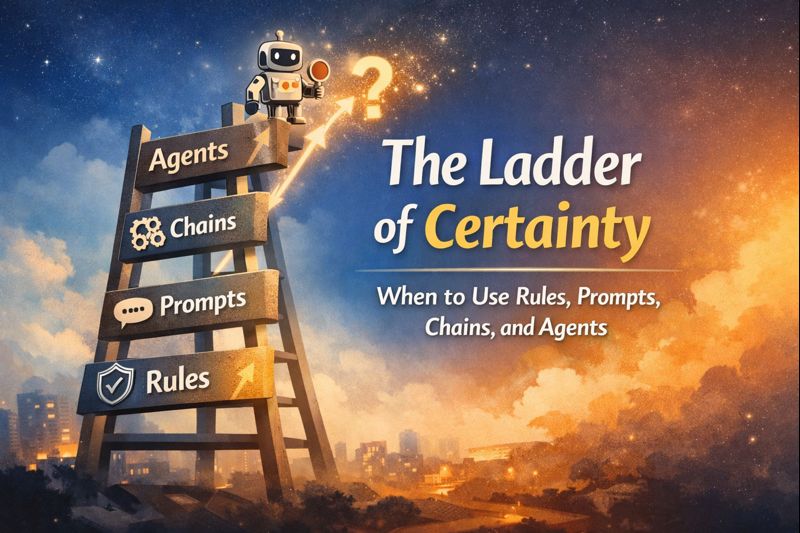
There are 4 ways to solve problems, depending on how certain we are about the path to success.
0) Hard rules / constraints
Use when you need deterministic outcomes. The result must be correct every time. For example, bank transactions must always transfer the required amount with 100% certainty.
1) Single prompt
Use when “good enough” is acceptable and a human (or fallback) can cover the misses. Best when quality is easy to judge quickly.
Example: Generate “related searches” suggestions for a query (good enough, quick human-like usefulness).
2) Chains (structured workflow)
Use when you can decompose the problem into known, repeatable steps and the order of steps is known upfront. Reliability comes from checkpoints between steps.
Example: Interpret intent → retrieve results → rerank → generate a short answer snippet with citations.
3) Agents (open-ended exploration)
Use when you don’t know the steps upfront and the work requires discovery. Best when the system must choose what to do next as it learns.
Example: “Help me research X” mode that iteratively searches, reads sources, refines queries, and updates the answer as it learns.
Key rule
As you move up the ladder (toward more uncertainty), you must increase verification: stronger evidence, clearer checks, tighter constraints.
The quest to build the universal personal assistant (UPA) has been reignited, with both OpenAI and Google going head to head. But what would the ultimate personal assistant look like? Would it be an app, a browser, an OS, or even a physical robot?
Let’s think first about ideal product requirements for a universal personal assistant:
Operator: Operates a computer the same way a human does—typing on the keyboard, moving/clicking the mouse, scrolling, etc.
Integrator: Able to interact with tools/apps/OS via either GUI or APIs.
Task Runner: Can run end-to-end tasks on multiple platforms (native OS, web) and across different apps.
Scalable: Executes tasks faster than a human and in parallel.
Private: Because the UPA might have root-level access on our device, local computation helps ensure privacy.
Interactive: Requests confirmation or clarification from the user when needed.
Headless: Allows the user and the assistant to work on the same computer simultaneously.
The technology to fulfill these requirements is rapidly emerging, which implies a new interface paradigm: from human → machine interaction to human → assistant → machine interaction. This approach can boost productivity and accessibility—particularly for people with disabilities.
Below, we’ll consider the main platforms on which a UPA might be built, evaluating each for:
Third-Party Integrations
Platform Integrations
Compatibility
Privacy
Cost
Scalability
Mobile
Overall Potential
We’ll then summarize and compare them in a simple scoring table.
1. Web App
Third-Party Integrations
Integrations must happen via APIs. The user needs to authenticate and authorize the PA for various services. This can be cumbersome if you use many products.
Payment information is often stored locally (e.g., OS keychain) or in browser storage, so the web app may not have direct access unless explicitly given permission.
On the upside, most B2C and B2B products have a web application, so coverage is broad.
Platform Integrations
Web apps do not have low-level access to hardware or platform-native apps.
For example, a purely web-based PA cannot open your local code editor or run commands in a terminal unless there’s an exposed API or user plugin to facilitate that.
Compatibility
The main benefit is cross-platform compatibility. Browsers run everywhere.
Most tools have a web version, so it’s fairly open.
Privacy
The assistant would typically run in the cloud. All that private data living on a remote server could concern some users.
Cost
Building a single cross-platform web app is cheaper than creating separate native apps.
Scalability
Tasks can be offloaded to a server, so the user’s local hardware isn’t heavily taxed. Parallel execution is feasible.
Mobile
A web app can run on mobile browsers, so this approach works on smartphones and tablets as well.
2. Browser Extension
Third-Party Integrations
A significant advantage is that users are often already logged into various services (e.g., Gmail, Drive, Trello) via the browser.
The user doesn’t necessarily re-enter credentials; sessions/cookies handle that.
However, the extension does require permission from the browser (e.g., “read data on all sites”) and the user must agree to those privileges. It’s not a zero-permission scenario, but it avoids re-typing logins for each new integration.
Platform Integrations
Extensions have more privileges than regular web apps regarding browser data (e.g., local storage, bookmarks, etc.).
However, they’re still limited to browser capabilities. Directly controlling native OS apps is harder unless additional bridging software is installed.
Privacy
Since the browser handles authentication and payments, the extension itself might never see raw credentials.
If the personal assistant uses local models (e.g., future small “on-device” LLMs), privacy is even better.
Complex tasks, however, might need powerful remote models that the extension offloads to the cloud.
Scalability
Each tab could run its own job. Parallelization is relatively straightforward.
Running everything locally might create overhead if multiple instances of large models are required.
Cost
Browser extensions can be simpler to develop than full native software. They leverage existing browser infrastructure.
Compatibility
Extensions are typically limited to Chromium-based browsers (Chrome, Edge, Brave, etc.).
Safari supports extensions too, but the development process is separate.
Mobile
Chrome on mobile currently offers very limited extension support. Safari on iOS supports some extensions, but it’s more restrictive. Compatibility on mobile is not as strong as on desktop.
3. A Browser (Standalone)
Third-Party Integrations
Like a web app, the user must authenticate each service, but the browser can use either API or GUI flows (clicking on login buttons, for example).
This potentially supports a wider range of products than an API-only approach.
Platform Integrations
A custom browser is a native app, so it has greater OS-level integration than a basic extension.
But users must grant additional permissions for deeper integration with local apps. If you work with many apps, this can be cumbersome.
The personal assistant can be deeply baked into the browser (e.g., voice commands, direct text interactions).
Privacy
Similar benefits to an extension: the browser can handle auth and payments.
A local AI model could be embedded (e.g., a future “on-device LLM”). Still, large or complex tasks might require server-based models.
Note: Currently, it’s rumored Google might incorporate smaller local LLMs (sometimes called “VLMs” or “Gemini Nano”), but that remains speculative.
Compatibility
Developing a new browser for multiple platforms—Mac, Windows, iOS, Android, etc. Is not trivial, even using Chromium.
Each OS version needs maintenance.
Scalability
Browsers can run multiple tabs/processes in parallel, and the entire thing could run in headless mode.
The assistant only needs to become visible when the user interacts or needs confirmations.
Cost
Building a cross-platform native browser is complex and expensive.
Mobile
A custom browser can work on mobile if you build versions for iOS/Android. This is doable, but each platform has its own store policies and technical requirements.
4. A Mobile App
Third-Party Integrations
The user would authenticate via OAuth, meaning each integrated product needs an API.
Many apps do not offer deep APIs, and mobile OSes sandbox apps, preventing direct control of other apps.
Platform Integrations
A native mobile app does have good access to device hardware (camera, mic, etc.), but direct OS-level control is often restricted by sandboxing.
Because a personal assistant is essentially an integrator, these restrictions can hinder advanced automations.
Compatibility
Separate iOS and Android versions are required. The codebases will differ significantly.
Scalability
Mobile apps often can’t run unlimited background processes. The OS may pause or kill them.
Offloading tasks to the cloud is possible, but purely local solutions may struggle to parallelize large tasks.
Mobile
Obviously, a mobile app can run on mobile devices, but constraints around sandboxing, battery usage, and background processing remain.
5. OS Integration
Third-Party Integrations
A UPA integrated into the operating system itself has the most straightforward approach: it can leverage the OS keychain for credentials and truly unify web and native apps.
Platform Integrations
Full OS-level access, not sandboxed. The assistant can open and manipulate all apps, services, and hardware resources.
Privacy
The tech stack can run locally for maximum privacy. Credentials are handled by the OS.
No need to share all data with a remote server, although remote tasks may still be desired for advanced AI computations.
Cost
This is likely only feasible for major platform vendors (Apple, Microsoft, Google). Implementing an OS-level AI solution is expensive and typically out of reach for smaller companies.
Scalability
The OS can run tasks in headless mode and notify the user only when necessary.
Parallelization is limited by local hardware, but it’s still quite powerful.
Compatibility
Only the company that controls the OS can do this effectively. So, this might remain exclusive to Apple, Google, Microsoft, etc.
Third parties can’t easily create a universal OS-level integration for everyone.
Note: We’ve seen Apple’s “Intelligence” and Microsoft’s “Copilot”; neither is perfect yet. If only the OS vendors can build such an integration, innovation might be slower or less open to outside developers.
6. A New Hardware Device
Third-Party Integrations
Typically relies on OAuth for web services; the user must add credentials for new products.
Similar friction for each integration.
Platform Integrations
New hardware implies a new OS or a heavily customized Android/Linux derivative.
Pros and cons of a new platform: can be built from the ground up for an “assistant-first” experience, but limited existing software.
Privacy
If the assistant runs on local hardware, data is more private.
But to handle advanced tasks, you may still need remote AI models.
Cost
Manufacturing new hardware is very expensive.
Building a mass-market device with advanced AI would be a huge undertaking.
Scalability
Could theoretically be designed for parallel background processes, but that requires robust on-device hardware, raising cost.
Offloading to the cloud remains an option if connectivity is constant.
Compatibility
A brand-new hardware/OS environment will have to integrate with existing services or rely on bridging apps/APIs.
If the device runs Android (like some new wearable), it may reuse existing software to some extent.
Mobile
Not directly applicable unless the new hardware is a phone or phone-like device.
7. A Robot
Many people’s dream assistant is a robot that can do house chores. Hardware exists, but “the brain” (AI) is still evolving. Such an assistant must operate in three environments: the real world, native OS, and the web.
NVIDIA and Tesla (with Optimus) are exploring this domain.
Currently, it’s easier to automate “white collar” digital tasks than “blue collar” physical tasks.
From a platform standpoint, this is similar to creating new hardware but with the added complexity of robotics and sensors.
Cost
Extremely expensive; Tesla estimates Optimus could retail at around $30K.
Plus, ongoing R&D and manufacturing costs.
Mobile
N/A in the usual sense, though some robotic devices might use mobile-like hardware (ARM chips, etc.).
Evaluation
A simple scoring table below ranks each option across seven criteria (with an optional multiplier for certain criteria). Scores are on a 1–10 scale unless otherwise stated, then summed for a rough comparison. These numbers are subjective but help illustrate trade-offs.
Platform
3rd Party Integrations (×2)
Platform Integrations
Privacy
Compatibility
Cost
Scalability
Mobile
Total
Web App
6
2
3
5
4
5
5
30
Browser Extension
8
3
4
4
5
4
2.5
30.5
Browser
8
4
5
2
2
4
5
30
Mobile App
4
3
4
1
2
1
5
20
OS Integration
10
5
5
1
1
4
5
31
Hardware Device
4
5
4
1
1
4
5
24
Robot
4
5
4
1
1
3
5
23
Note on Browser vs. Browser Extension Mobile Scores:
A standalone browser (with the assistant built in) can theoretically be packaged for iOS/Android, hence we give it a higher mobile score (5).
A pure extension is poorly supported on mobile Chrome, hence 2.5. Safari has some extension support, but it remains limited.
Conclusion
From the table, OS Integration scores the highest in raw technical potential. However, only major OS vendors (Apple, Microsoft, Google) can realistically implement that at scale. For everyone else, web apps and browser extensions emerge as the most practical solutions. Both are strong “integrators” because:
They allow cross-platform compatibility.
They can interface with a wide variety of web-based products.
They don’t require building entirely new OS or hardware ecosystems.
Between the two, a browser extension often enjoys more seamless authentication (thanks to existing sessions) and can bypass certain bot blockers by “simulating” a real user in a regular browser context. However, it’s less friendly on mobile devices. Meanwhile, a web app is fully cross-platform, including mobile, but might require repeated authentication for each service and can be blocked by strict bot protections.
In short, a web app + browser extension combo is the most viable for broad adoption, especially on desktop. On mobile, the web app may be more reliable than an extension until mobile browsers fully embrace extension frameworks. Over time, we might see OS-level personal assistants from big tech or entirely new device categories, such as wearables and robotics, once the underlying AI is mature enough.
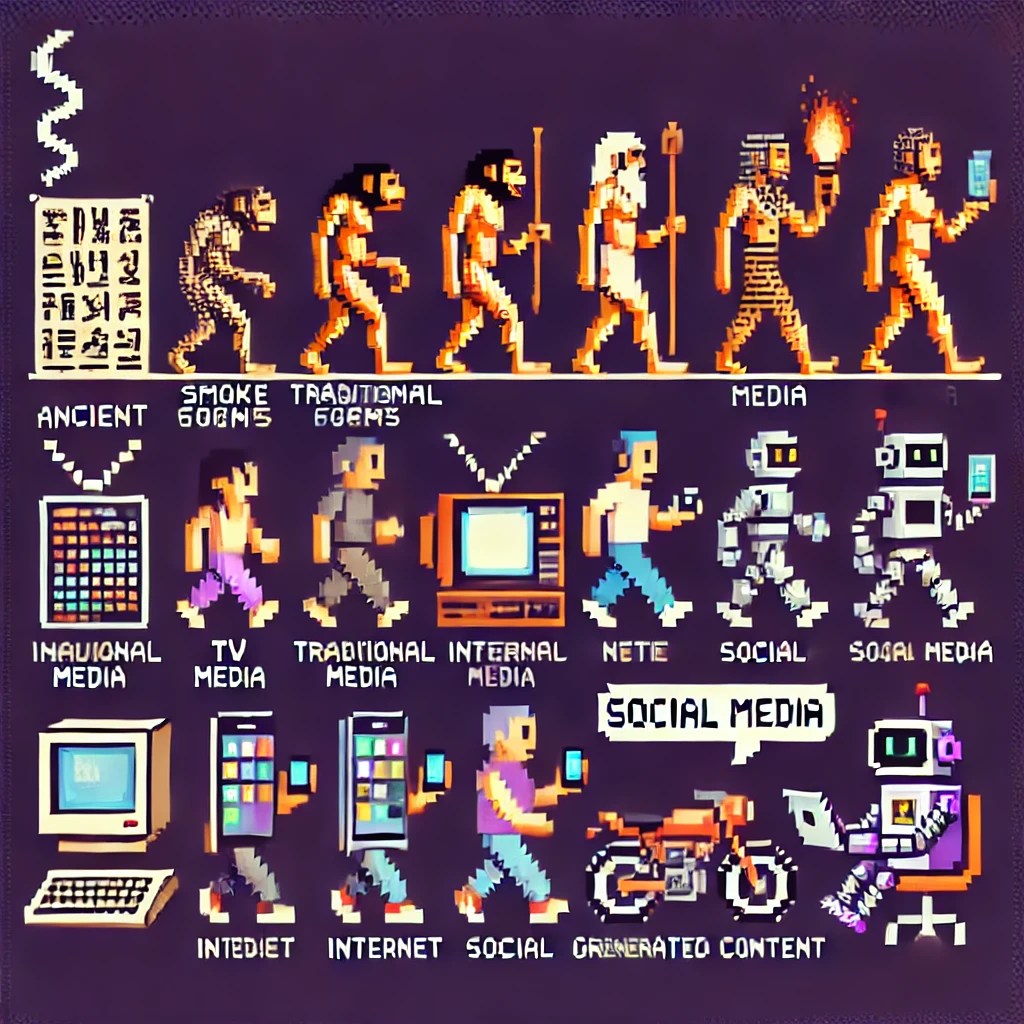
Sharing stories and messages with an audience has been a fundamental human need since ancient times. From smoke signals and hieroglyphs to theatre acts and folklore songs, various formats have been used as means of communication across different cultures.
Traditional Media
Historically, traditional media outlets created content for specific audiences and distribution channels such as TV, newspapers, and magazines. Both content creation and distribution were expensive endeavours, limiting access to those with substantial resources.
The Internet
The Internet significantly lowered the costs of content creation and distribution. Anyone willing to set up their own website could create and share content with anyone who had an internet connection, democratising information dissemination.
Social Media
Social media platforms eliminated the need to set up a personal website by providing tools to create and share content easily. Distribution became based on personal networks built by following others and gaining followers. With just an internet connection, anyone could broadcast content to their network, with the primary cost being the time invested in creating content.
Interest-Based Content Platforms
The next evolution occurred at the distribution layer. Instead of users following people, content platforms began to discern users’ interests by recommending content and fine-tuning suggestions based on user interactions. This shift expanded the content pool for recommendations from hundreds (within one’s network) to millions (across the entire network) of items. Content creators evolved from being people within your network to interest-based creators catering to specific topics or niches.
AI-Generated Content
The latest iteration is powered by Large Language Models (LLMs). This technology reduces content creation costs for text and images, with video capabilities on the horizon. In many applications, content is now generated on the fly. For instance, search engines are evolving into answer engines, providing unique responses to queries instead of just links.
While the quality of user-generated content (UGC) and UGC enhanced with AI currently surpasses that of pure AI-generated content, the gap is closing. The quality of AI content is improving rapidly and is poised to exceed traditional UGC. It’s conceivable that within our lifetime, personalised movies will be created based on individual interests.
Tailored Content
Content can now be tailored specifically for individual users, making them the sole consumers. Instead of ranking content from an existing pool, content is generated uniquely for each user. This approach eliminates the cold start problem that content platforms face, as there’s no need for a pre-existing content pool or a content ranking algorithm to decide what to show users.
Moreover, because the content is personalised, users can choose the quantity, formats, styles, and subjects that interest them most.
Human Connection
Social networks possess a human warmth that makes them appealing. This warmth might come from a funny comment, a shared interest, or a friend’s post that brings happiness. The ability of a platform to evoke positive emotions contributes significantly to its success, and human-to-human interactions are the most common way to generate such feelings. It remains to be seen whether AI can replicate these emotional connections.
Language-Image Pre-Training (LIP) has become a popular approach to obtain robust visual and textual representations. It involves aligning the representations of paired images and texts, typically using a contrastive objective. This method was revolutionized by large-scale models like CLIP and ALIGN, which demonstrated the viability of this approach at a massive scale [1]. As the field progresses, researchers continue to seek methods to make LIP more efficient and effective, addressing challenges such as large batch sizes and resource constraints.
The Sigmoid Loss Innovation
Key Problem with Contrastive Learning
Traditional contrastive learning relies on a softmax-based loss function, which requires normalization over the entire batch of image-text pairs. This approach can be computationally expensive and memory-intensive, often necessitating a complex and numerically unstable implementation [1].
Introducing Sigmoid Loss
To address these challenges, researchers at Google DeepMind have proposed a simpler alternative: the pairwise Sigmoid loss for Language-Image Pre-Training, termed SigLIP. Unlike the softmax normalization, the Sigmoid loss operates solely on individual image-text pairs, which simplifies the computation significantly [1].
Benefits of Sigmoid Loss
Memory Efficiency: The Sigmoid loss requires less memory compared to the softmax-based contrastive loss. This makes it possible to scale up the batch size without increasing computational resources exponentially [1].
Decoupling Batch Size: By not requiring operations across the full batch, the Sigmoid loss decouples the definition of the task from the batch size, allowing flexibility in training setups [1].
Table 5: SigLIP zeor-shot accuracy (%) on the ImageNet benchmark. Both the sigmoid loss and the softmax loss baseline are presented. Experiments are performed on multiple train examples seen (3 B, 9 B) and train batch sizes (from 512 to 307 k). When trained for 9 B examples, the peak of the sigmoid loss comes earlier at 32 k than the peak of the softmax loss at 98 k. Together with the memory efficient advantage for the sigmoid loss, it allows one to train the best language-image model with much fewer amount of accelerators.
Experimental Validation
A series of experiments demonstrated that SigLIP models outperform their counterparts using softmax loss, particularly in smaller batch sizes. For instance, SigLIP achieved 84.5% zero-shot accuracy on ImageNet with only four TPUv4 chips in two days [1].
Efficient Training With Locked-Image Tuning
SigLiT Model
The team also introduced the SigLiT model, combining the Sigmoid loss with Locked-image Tuning (LiT). This method achieved remarkable efficiency, with the SigLiT model reaching 79.7% zero-shot accuracy on ImageNet in just one day using four TPUv4 chips [1].
Impact on Batch Size and Training Duration
Table 6: Default hyperparameters across different batch sizes, perform either the best or close to the best hyperparameter from a sweep. Zero-shot accuracy on ImageNet is reported. BS=batch size, LR=learning rate, WD=weight decay.
Through extensive testing, researchers found that while larger batch sizes do offer some performance benefits, the gains diminish beyond a certain point. Surprisingly, a batch size of 32k appeared to be almost optimal, balancing performance and resource efficiency [1].
Multilingual and Robust Pre-Training
Table 2: Multilingual SigLIP results with various batch sizes, pre-trained for 30 billion seen examples. We report zero-shot transfer results on ImageNet (INet-0) and averaged text to image retrieval results across 36 languages on the crossmodal 3600 dataset (XM). The full table on 36 languages can be found in Appendix.
mSigLIP: Multilingual Adaptation
Expanding the approach to multilingual data, the team pre-trained models on datasets covering over 100 languages. They discovered that a batch size of 32k was also sufficient for effective multilingual training, and going beyond this size didn’t yield significant improvements [1].
Robustness to Noise
Another notable advantage of the Sigmoid loss is its robustness to data noise. Models trained with Sigmoid loss demonstrated a higher tolerance to various types of corruption (e.g., random noise in images or texts), retaining performance superiority over softmax-trained models even under noisy conditions [1].
Conclusion
The introduction of Sigmoid loss for Language-Image Pre-Training marks a significant advance in the efficiency and effectiveness of LIP models. By simplifying the loss computation and decoupling it from batch size requirements, SigLIP and SigLiT models offer compelling performance with reduced computational overhead. These innovations not only facilitate better utilization of limited resources but also present a robust framework adaptable to multilingual contexts and resistant to data noise. This development paves the way for more accessible and scalable language-image pre-training, fostering further exploration and improvement in the field.
By integrating Sigmoid loss, researchers and practitioners can achieve high performance in LIP tasks with optimized resource use, making advanced AI more accessible and practical for diverse applications [1].
Large Language Models (LLMs) have transformed artificial intelligence, leading to significant advancements in conversational AI and applications. However, these models face limitations due to fixed-length context windows, impeding their performance in tasks that require handling extensive conversations and lengthy document analysis.
Limitations of Current LLMs
Despite their revolutionary impact, current LLMs are hindered by constrained context windows that limit their effectiveness in long-term interactions and extensive document reasoning. When the context length is extended directly, the computational time and memory costs increase quadratically due to the transformer architecture’s self-attention mechanism [1]. Even attempts to develop longer models are challenged by diminishing returns and inefficient utilization of extended context [1].
Introducing MemGPT
Concept and Inspiration
MemGPT (MemoryGPT), inspired by hierarchical memory systems in traditional operating systems, proposes virtual context management to address the limitations of fixed-context LLMs [1]. This technique creates the illusion of an extended virtual memory through ‘paging’ between different storage tiers, analogous to the paging mechanism between physical memory and disk in traditional OSes [1].
System Design
MemGPT incorporates a multi-level memory architecture, differentiating between main context (similar to RAM) and external context (similar to disk storage) [1]. The main context consists of LLM prompt tokens, encompassing system instructions, working context, and a FIFO queue [1]. External context refers to any information outside the LLM’s fixed context window, accessible only when moved into the main context for processing [1].
Main Context: Comprises system instructions, working context, and FIFO queue [1]. System instructions provide guidelines on control flow and memory management [1]. The working context stores key facts and preferences about the user, while the FIFO queue maintains a rolling history of messages [1].
External Context: Functions via MemGPT’s paging mechanism, storing data that is dynamically moved in and out of the main context based on relevance and necessity [1].
Function Management and Control Flow
MemGPT uses function calls to manage data movement between main and external contexts without user intervention [1]. These functions allow the LLM to perform self-directed memory edits and retrievals, facilitating efficient utilization of limited context [1].
Function Executor: Handles completion tokens and facilitates data movement between contexts. It ensures correctness through parsing and executes validated functions, creating a feedback loop that enables the system to learn and adjust its behavior [1].
Queue Manager: Manages messages in recall storage and FIFO queue, maintaining context overflow and underflow through a queue eviction policy [1].
Experimental Evaluation
Conversational Agents
MemGPT’s effectiveness was demonstrated in two key scenarios: conversational agents and document analysis.
1. Conversational Consistency and Engagement:
MemGPT’s Design: The system manages long-term interactions by storing key information in working context and using retrieval functions to bring relevant data into the current context [1].
Performance: Experimental results showed that MemGPT significantly outperformed fixed-context baselines in maintaining conversation consistency and generating engaging responses [1]. For instance, in the deep memory retrieval task, MemGPT with different LLMs (e.g., GPT-4) showcased higher accuracy and ROUGE-L scores compared to their fixed-context counterparts [1].
Document Analysis
2. Handling Lengthy Texts:
MemGPT’s Capability: In document analysis, MemGPT processes long texts by dynamically managing context, enabling reasoning across documents that exceed the fixed context window of modern LLMs [1].
Multi-document QA Performance: MemGPT outperformed fixed-context models by effectively querying archival storage and handling large datasets [1]. The system’s ability to paginate through retriever results allowed it to maintain high accuracy even as the number of documents increased [1].
Conclusion
MemGPT represents a significant advancement in addressing the context limitations of LLMs. By drawing upon principles from traditional OS memory management, MemGPT enhances the utility of LLMs in tasks requiring extensive context handling. This innovation opens doors for further exploration in applying MemGPT to various domains requiring long-lasting memory and extended context management. Future research can explore integrating different memory tier technologies and refining control flow and memory management policies to maximize the capabilities of LLMs [1].
ColPali is a novel document retrieval model that significantly enhances the efficiency and accuracy of matching user queries to relevant documents. It leverages the advanced document understanding capabilities of recent Vision Language Models (VLMs) to produce high-quality, contextualized embeddings derived solely from images of document pages.
The Challenge in Modern Document Retrieval Modern document retrieval systems struggle with integrating visual cues effectively, which limits their performance, especially in applications that require both textual and visual comprehension. Traditional systems primarily focus on text extraction and processing, which involves multiple steps like Optical Character Recognition (OCR) and layout detection before embedding the text for retrieval [1].
Introducing the ViDoRe Benchmark
To evaluate the performance of current systems on visually rich document retrieval, the researchers developed the Visual Document Retrieval Benchmark (ViDoRe). ViDoRe encompasses various page-level retrieval tasks across multiple domains, languages, and settings, aiming to highlight the limitations of text-centric systems and the necessity of integrating visual elements [1].
ColPali: A Novel Solution ColPali utilizes Vision Language Models to generate embeddings from document images, eliminating the need for complex and time-consuming text processing pipelines. This approach not only improves accuracy but also drastically reduces indexing time. Combined with a late interaction matching mechanism, ColPali delivers superior performance compared to conventional methods while maintaining speed and efficiency [1].
Key Findings and Performance
Improved Efficiency and Accuracy: ColPali outperforms traditional retrieval systems across the board, particularly in visually complex benchmark tasks like infographics, figures, and tables [1].
Reduced Indexing Time: ColPali simplifies the document retrieval process. Rather than processing text through multiple steps, it directly encodes pages from images, which speeds up indexing significantly [1].
Enhanced Interpretability: The model’s capability to overlay late interaction heatmaps on document images allows for visualizing which parts of the document were most relevant to the query, providing clear insights into its decision-making process [1].
Similarity of the image patches w.r.t. the underlined token in the user query. This example is from the Shift test set
Conclusion ColPali emerges as a groundbreaking model for document retrieval by effectively utilizing vision language technology to handle visually rich documents. This model sets a new standard for efficiency, accuracy, and interpretability in document retrieval systems, making it highly suitable for industrial applications where rapid and accurate document retrieval is critical.
I’ve put together this presentation to help anyone with a technical background to build their own LLM powered applications. The topic is quite broad but it covers all the basic moving parts for you to bear in mind.
The notebook (link at the end) covers the basic building blocks to adapt LLMs for your own use case:
Data collection/generation/augmentation.
Fine tuning Gemma with a P100 GPU and Lora
Document chunking for RAG
Chunk ranking using ColBERT and BERT/Gemma embeddings
Evaluation using a LLM judge (Gemini Pro)
Evaluation using a distance metric.
Here is an excerpt of the main findings so far:
Dataset generation, RAG with ColBERT and query strategy yield the best evaluation scores.
Gemma already has Kaggle knowledge out of the box so fine tuning with new data didn’t make much difference.
Fine tuning (FT) is for learning new abstractions rather than memorising new data for QA. Overfitting does help with memorisation though.
Single vector search is bad because document pooling operations throw away too much signal. ColBERT is multi-vector
so no pooling involved so signal is preserved.
Using a larger and more capable model (Gemini) as a judge is a good evaluator but pricey.
RAG + RAW: use RAG and train the model to say “I don’t know” if an answer isn’t in the context, then use the raw model as a fallback. This improves evaluation scores.
MLLMs (Multi Modal Large Language Models) such as GPT-4V and Gemini are able to ingest data in multiple modalities such as: text, video, sound and images. Personally, one of the most useful applications of MLLMs is UI navigation. As a SWE, you could have an web based agent that runs Gherkin-like syntax tests without having to write any code. Or, you could instruct your browser to book a flight for you, re-schedule a meeting, book a table, etc.
However, the ability to do VQA (Visual Question Answering) with MLLMs is conditioned by how much signal is preserved when downscaling images to meet MLLM input size requirements. This is particularly challenging when images have odd an aspect ratio like a webpage screenshot. Ideally, we don’t want to loose any signal. As a comparison, there is no signal loss in LLMs.
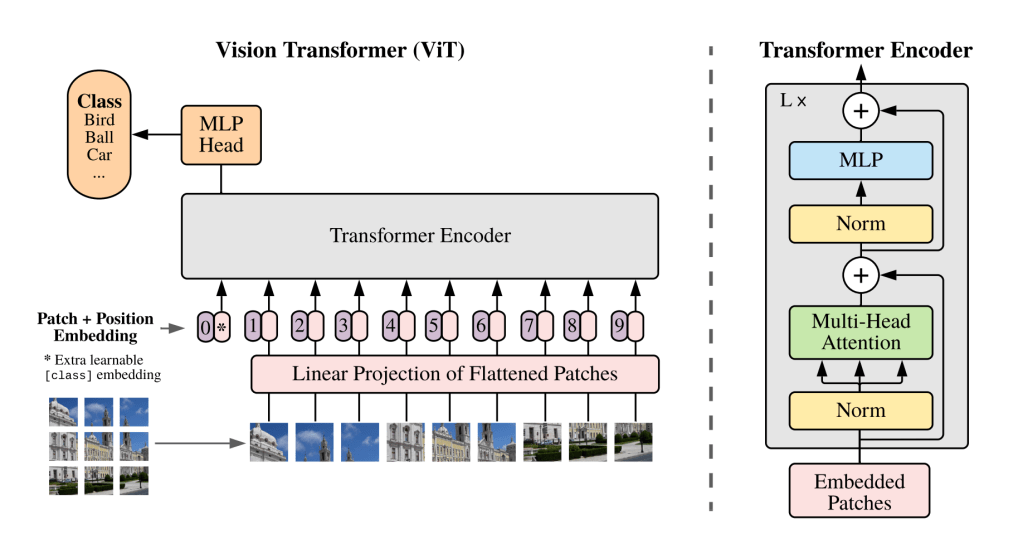
Google came up with ViT (Vision Transformer), it breaks down an image into a 16×16 grid. Each cell in the grid is a patch that’s also a token. Image tokens are linearly projected into a transformer.
The 16×16 grid is great for images with a 1:1 aspect ratio but not so great for other aspect ratios. I also thought that linearly projecting the images would remove the need to downscale but no. In the case of GPT-4V, the image needs to be downscaled to fit in a 2048px X 2048px grid. Each patch/token has 512×521 pixels. Therefore this is a 4×4 grid.
We need MLLMs that can handle multiple aspect ratios without having to downscale images so there is no information loss.
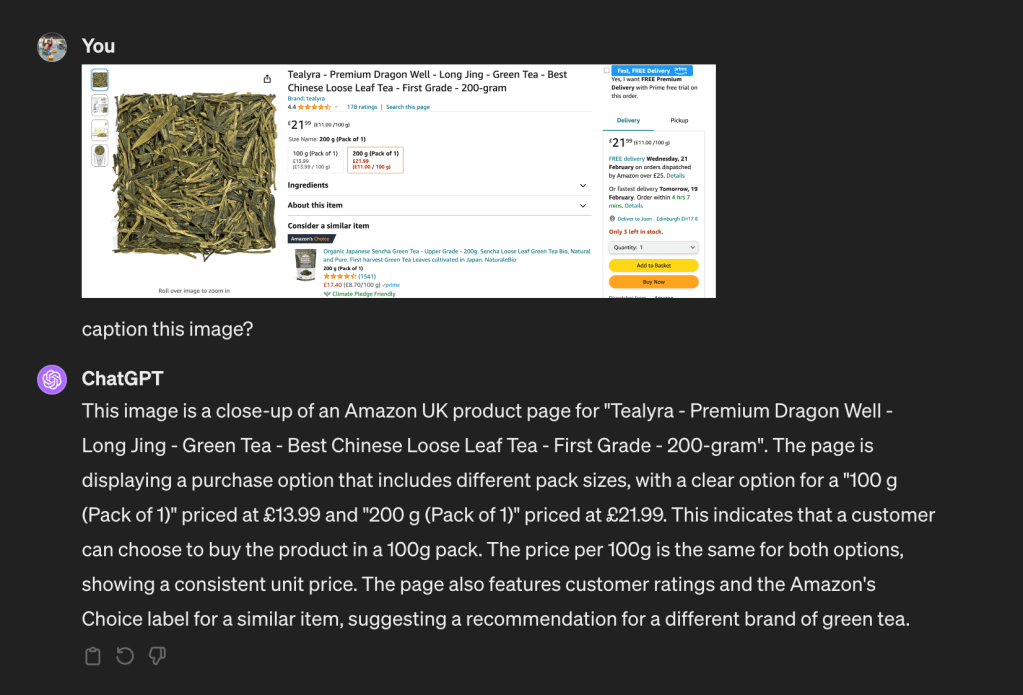
Firstly, I asked chatGPT to generate an image caption:
The caption is good. After that, I asked if there is a 100g variation for this product and I got:
This is not true, there is a 100g option that is clearly visible.
Following that, I took a screenshot of the section of the web page that has the multiple options. Then I asked chatGPT to generate a caption. This section has a friendlier aspect ratio ~2:1.
chatGPT got it right this time. It has identified that there is a 100g option priced at £13.99. I think this shows that MLLMs are good at handling images with an aspect ratio close to 1:1 with minimum downscaling.
Gemini
Let’s now look at how Gemini responds to the prompt “describe this image” given the webpage screenshot.
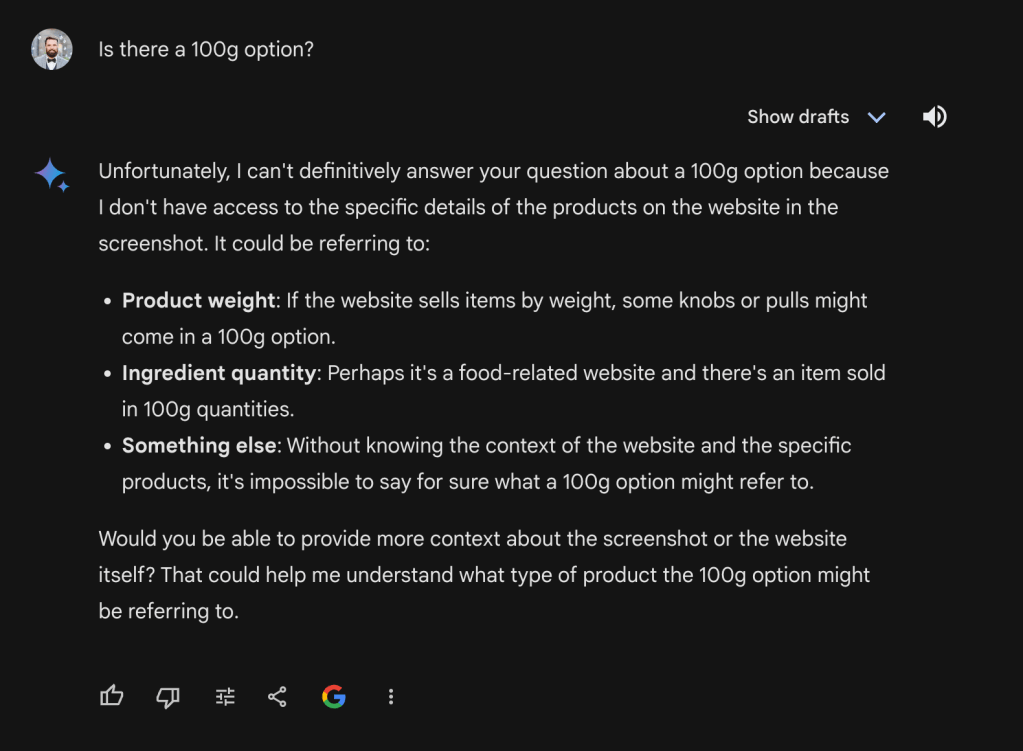
This isn’t good. This is a product page about green tea not kitchen hardware… For the sake of evaluation, I also prompted Gemini with “Is there are 100g option?”
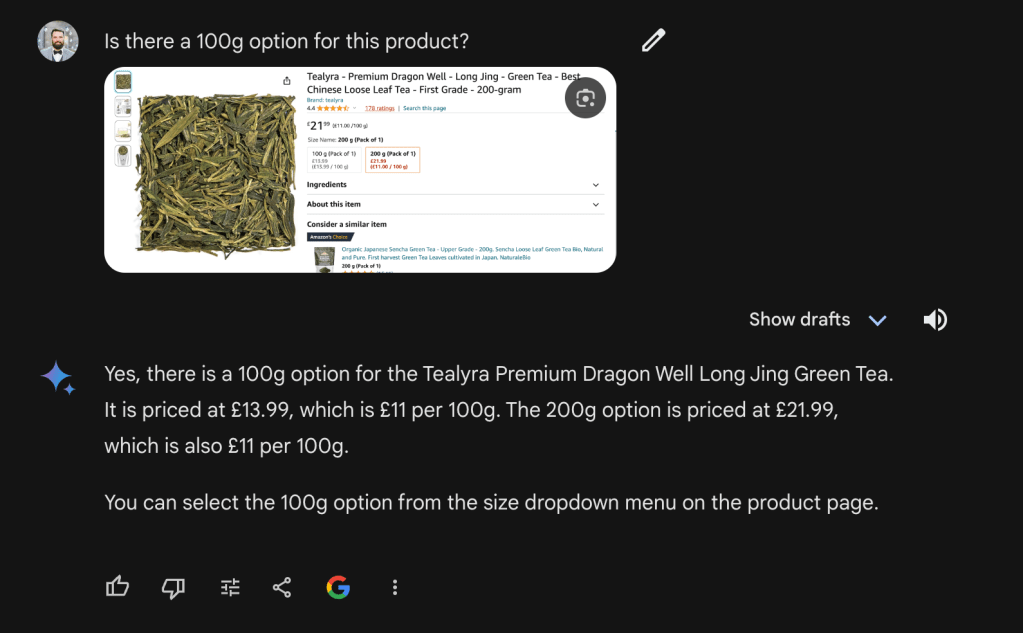
Gemini couldn’t answer my question. I then took a screenshot of the section with multiple weight options and a friendlier aspect ratio.
Similarly to GPT-4V, This also worked well. However, it shows that Gemini is not good at dealing with images that have an odd aspect ratios like web page screenshots.
GPT-4V API AND IMAGE CHUNKING
The examples above were carried out using chatGPT and Gemini’s web app. I also tried to do the same via the GPT-4V API with the high fidelity flag setup. The documentation recommends:
For high res mode, the short side of the image should be less than 768px and the long side should be less than 2,000px.
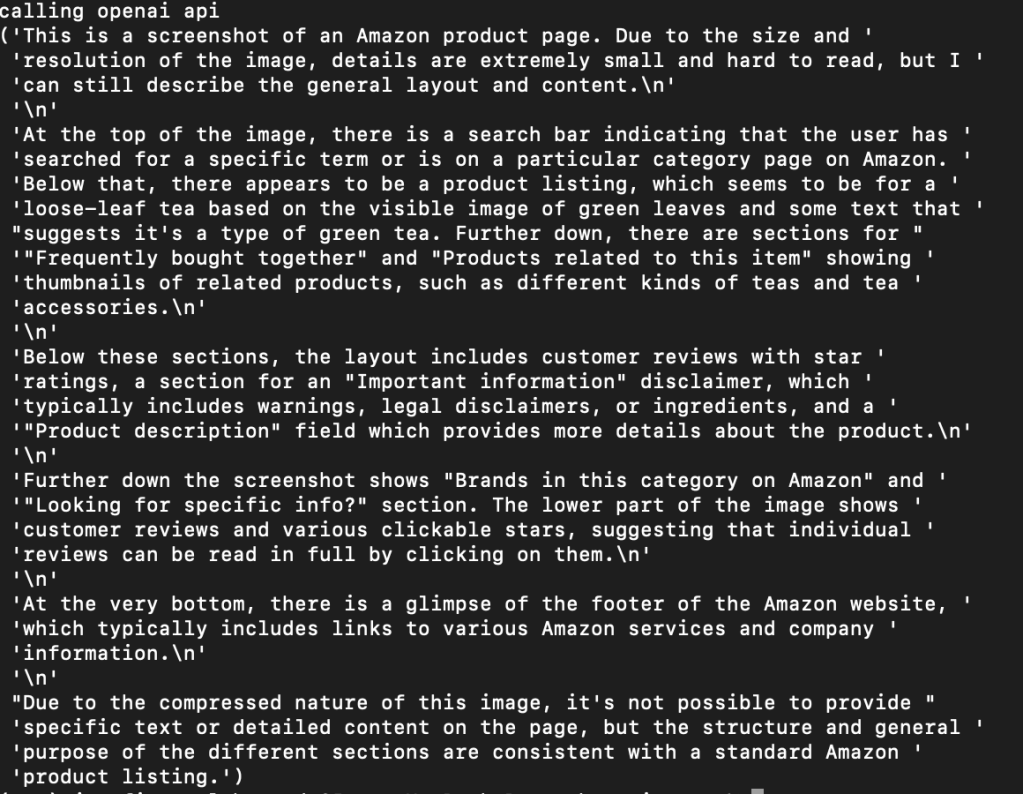
As suggested, I downscaled the image from 3840×20294 to 387×2048. After that, I encoded the image to base64 and fed it to the model alongside the prompt “Is there a 100g option?”.
Unsurprisingly, downscaling makes large images loose too much signal so the model is not able to answer our prompt. How do we solve this? Similarly to RAG’s chunking, we can also chunk images. For this particular example, I chunked the screenshot into 7 chunks. Then, I downscaled each image as per OAI requirements. Each chunk is 1017×768. GPT-4V can handle multiple image inputs:
The Chat Completions API is capable of taking in and processing multiple image inputs in both base64 encoded format or as an image URL. The model will process each image and use the information from all of them to answer the question.
OAI Documentation
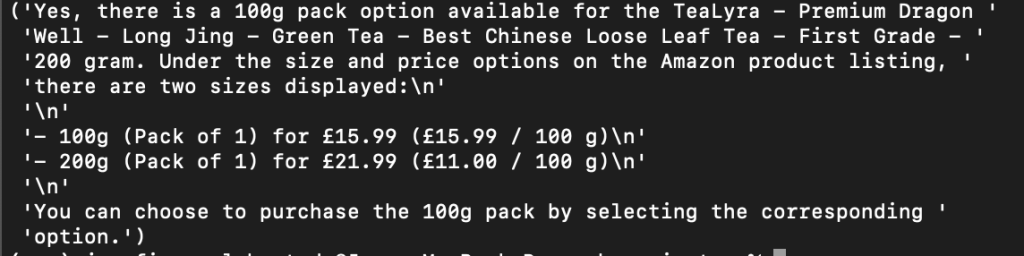
Therefore all the image chunks can be fed in one request with minimum signal loss alongside a text prompt “Is there are 100g option ?”
This has worked well so it shows that image chunking is a good strategy. Note that to do image chunking, we want to pick a number of chunks that minimises the signal loss when downscaling. This might not be trivial at first and it might be domain specific. For web pages, 5-10 chunks seems to work well across the board.
Overall, the ability to do VQA with existing MLMMs is conditioned by how much signal is preserved when downscaling . I’ll upload the code to do image chunking and post it soon.
Generative AI is opening the doors to new products. It’s great to witness in real time how the Internet is evolving and to imagine what it might become in the coming years. Search, UI navigation and content generation are the trident technologies leading this evolution.
Search
The Internet acts as the largest repository of knowledge worldwide. Search engines guide us through the Internet, directing us to web pages likely to have the answers we seek.
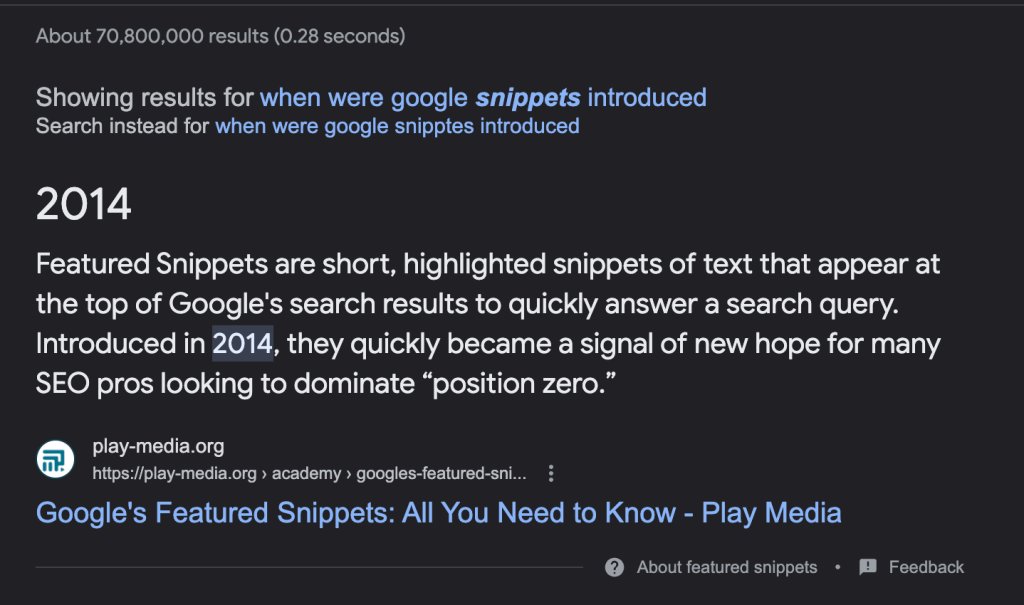
By 2014, this functionality evolved further, allowing search engines to highlight specific passages within web pages that are most likely to contain the answers to our questions. This means that search engines now fulfil both navigational and informational purposes, making it easier to find information quickly within SERPs.
Answer
In 2018, Large Language Models demonstrated a way to generate answers from the Common Crawl (CC) dataset. CC is a web index with 3B web pages. The technical breakthrough is that LLMs can retrieve relevant bits of information from all those 3B web pages. However, there are three caveats. First, LLMs can’t tell what specific source has been used to generate an answer. Second, when the LLM doesn’t have information about a topic, it hallucinates. Third, LLMs are not suitable to fulfil navigational intents.
In 2020, Meta introduced RAG. It connects LLMs to the external data sources like the Internet so answers are grounded in sources. This is great because we can reference specific web pages and passages. However, the amount of sources that can be used to generate an answer is limited by the LLM’s token context length.
In 2023, the AI community gave LLMs autonomy and the concept of AI agents was born. An objective is given to an agent and it figures out what to do to complete it. This usually involves planning, multiple task execution, performing external actions, using memory, etc. For example, AskPandi is an AI search agent.
UI Navigation
Another advancement is in UI navigation, facilitating browser and workflow automation. This development enables us to assign tasks to an agent, which can then execute them on our behalf. As a result, we’re moving from direct human-computer interaction to a more seamless human-assistant model. Here is a little example to automatically dismiss cookie consents.
Bye bye cookie consents 🚮
MLLM can be used to always accept cookie consents so you enjoy the web without intrusions 😌
Existing cookie consent plugins are DOM based and hardcode CSS classes/ids from popular sites or cookie consent providers.
We have the capability to direct a LLM to produce or modify content on our behalf, making content creation more accessible than ever. However, the key to success lies in generating content that people want. Content that lacks effort or relevance is easily recognisable and less likely to engage readers.
The Generative Internet Is Born
The three advancements in search, UI navigation, and content generation unlock new product opportunities. Search engines evolve into answer engines that interact with the web for us, picking only the relevant bits of information from multiple sources and composing an answer that is essentially an interactive UI.
For example, “suggest a 5 day trip to a surf break in Europe. Also get me flight and accommodation information, including pricing“.
To complete this objective, we need to conduct multiple searches and then combine the outcomes into a single compelling answer.
But, what happens after we find the information we are looking for?
For this particular example, a natural follow-up action might be to book flights and accommodation. In this context, UI navigation proves invaluable because it allows us to instruct an AI agent to automate those tasks for us.
UI navigation facilitates workflow automation, making mundane tasks such as rescheduling a meeting, bookings, or ordering something executable in natural language. This is akin to iOS shortcuts, but without the need to write custom integrations because the web is open.
At this point, the user rarely interacts with the web, an assistant does it for us.
Finally, machine generated content has an important part to play because our needs to access knowledge is ever growing. In my last research paper, I found out that it only takes 5 hops to find knowledge gaps on the Internet. In addition, new research has also found that our knowledge needs are outpacing the amount of content available on the public web, thus giving the impression that search engines are becoming worse. I suspect walled gardens like social media platforms have something to do with it too because their content isn’t public.
If assistants interact with the web for us, what’s the point of web pages?
Most UI navigation systems are being trained on traditional UIs so they are still relevant. In addition, there are many situations where a user will have to step in like confirm a purchase, authentication, captcha, payment details, etc.
However, interacting with the web via API calls instead of UI navigation is faster so I suspect products that provide an API to an assistant will have an edge here.
What happens to web content creators who rely on ad-traffic?
Ads, if relevant, are good content. Since AI assistants are very good at filtering out irrelevant content, web content creators will need to ensure that their sponsored content is also relevant.
What’s the equivalent of backlinks in a generative Internet?
Backlinks from reputable domains are a good ranking signal in traditional search engines. However, what’s the equivalent of a backlink when assistants generate unique web pages on the fly so there is no unique link to refer to? It feels there is a need for better ranking signals. I wouldn’t be surprised if AEO (Answer Engine Optimisation) becomes a thing.
What happens to social media?
We are transitioning from information extraction to generation. This increases relevancy so good for users. I think someone will make a social network where 100% of the content is generated.
To sum up, search, UI navigation and content generation are reshaping the Internet as we know it.











 Joan's Tech Stuff